Migrating to the cloud is a complex journey. Between decoding existing infrastructure, projecting future costs, and aligning licensing models, most organizations quickly discover that spreadsheets aren’t enough.
That’s where Cloudamize’s ANALYZE component steps in. By turning raw performance data into clear Total Cost of Ownership (TCO) models, ANALYZE helps you identify cost savings, avoid over-provisioning, and build a confident migration business case.
In this post, we’ll explore:
- How the ANALYZE module works within the Cloudamize suite
- What kind of results you’ll see after data collection
- How to use dashboards, Designers, and reports to shape strategy
- Visual examples of the insights and workflows available
From Raw Data to Cloud Strategy
Once infrastructure data is collected through DISCOVER, Cloudamize ANALYZE goes to work:
- TCO Plans: Compare cost models across AWS, Azure, and GCP.
- Rightsizing Recommendations: Ensure workloads are sized to actual performance, not just hardware specs.
- License Optimization: Align software licensing (SQL, Windows, Oracle, etc.) with cloud usage.
- Scenario Modeling: Explore different “what-if” cases — from commitment terms to instance family restrictions.
|
50% Savings |
Understanding the Data Collection Process
Before results can be generated, Cloudamize gathers performance data through several methods:
- Agent-based (deepest insights, supports SQL telemetry and dependencies)
- Agentless Data Collector (ADC) (lighter install, uses WMI/SSH)
- Hypervisor-level (vCenter/Hyper-V metrics)
Cloudamize typically requires 11 days of data collection plus 3 days of processing.

Preliminary Hardware Results
Early in the assessment, Cloudamize provides a Preliminary Hardware Plan.
- Matches existing CPU, memory, and storage to cloud equivalents
- Offers a baseline cost estimate before usage data refines the model
- Replaced later by full usage-based results
Interpreting Results: The ANALYZE Dashboard
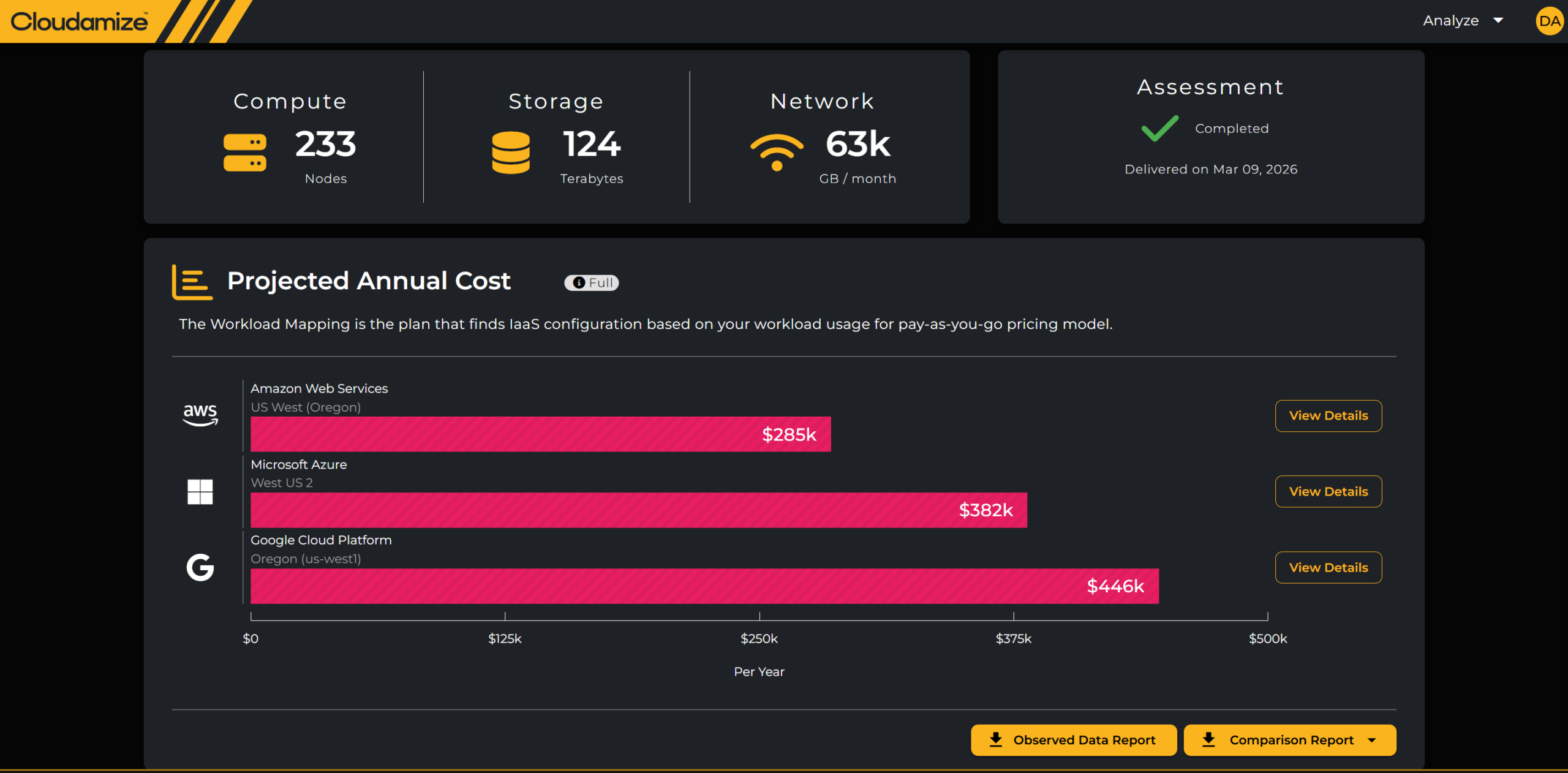
Once processing is complete, the Projected Annual Cost dashboard becomes the central view. Here’s what you’ll see:
- Cost by Cloud Provider (AWS vs. Azure vs. GCP side-by-side)
- Infrastructure Summary (compute, storage, network, license breakdown)
- Observed Data Report and Comparison Report for detail
Deep Dive Tabs
Each tab provides specific insights:
- Compute: Recommended instance types, right-sizing constraints (CPU, memory, I/O).
- Storage: Disk type, RAID composition, occupancy adjustments.
- Network: Modeled egress costs (all traffic conservatively treated as outbound).
- License: BYOL vs. provider-included licensing, with cost comparisons.
- Summary: Roll-up of cost and performance trade-offs.

Fine-Tuning with the Designer
The Designer allows you to go beyond the defaults:
- Adjust thresholds (CPU at 80% vs. 70%)
- Apply 2nd/3rd standard deviation sizing methods
- Add or remove discounts, BYOL, or Graviton instance considerations
- Clone designs to compare multiple scenarios
Learn more about Designer with AWS, Designer with GCP, and Designer with Azure.

Modernization Pathways (Currently AWS Only)
Easily explore light-weight modernization pathways as part of defining the TCO.
- RDS for Databases
- FSxW for File-servers Recommendations
- FSxN for Storage Recommendations (Coming in June of 2026)
- Container-to-Container Recommendations (Coming in July of 2026)
Exporting Reports for Stakeholders
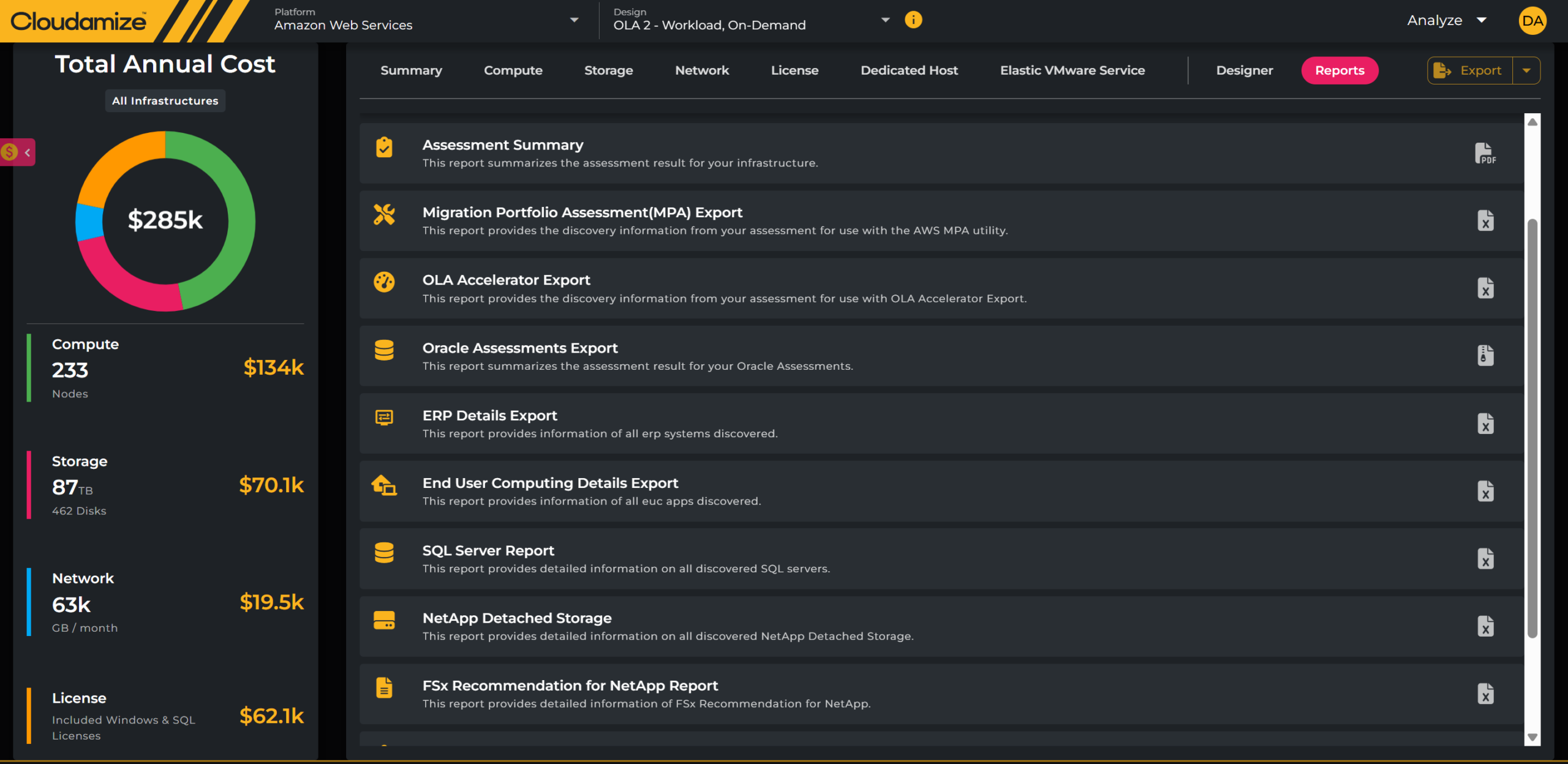
Cloudamize supports rich export formats:
- Assessment Summary (executive-friendly overview)
- Comparison Report (provider cost breakdowns)
- Detailed Plan Exports (firewall rules, migration settings, installed apps)
- Specialized reports (SQL, Oracle, ERP, NetApp, Graviton Readiness)
Bringing It All Together
With ANALYZE, enterprises gain:
- Clarity on cost trade-offs across providers
- Confidence in right-sized instance recommendations
- Flexibility to tune assumptions and test “what-if” cases
- Actionable Reports to guide both IT and finance leaders
Migrating to the cloud isn’t just about moving servers — it’s about building a strategy that balances performance, cost, and scalability. Cloudamize ANALYZE provides the lens to see that strategy clearly.
Ready to get your migration started? Schedule a demo with us.
Author