Why Cloud Migration Planning is Hard
Migrating to the cloud can unlock agility, scalability, and cost savings, but without a solid plan, the process often derails. Hidden application dependencies, unclear migration waves, and lack of visibility are among the top reasons projects run over budget or miss deadlines.
That’s why Cloudamize built the PLAN component, a purpose-designed tool that transforms discovery and analysis data into an actionable roadmap. It helps enterprises plan migrations at scale with confidence, accuracy, and speed.
What is Cloudamize PLAN?
The PLAN component is the bridge between insight and execution. Building on Cloudamize’s DISCOVER and ANALYZE capabilities, PLAN allows IT teams to:
- Map application dependencies
- Organize resources into migration groups
- Define and sequence migration waves
- Apply business context through tagging
- Generate detailed migration reports
In short: it takes the complexity out of cloud migration planning.
Key Features of the PLAN Component
Server Centric Planning
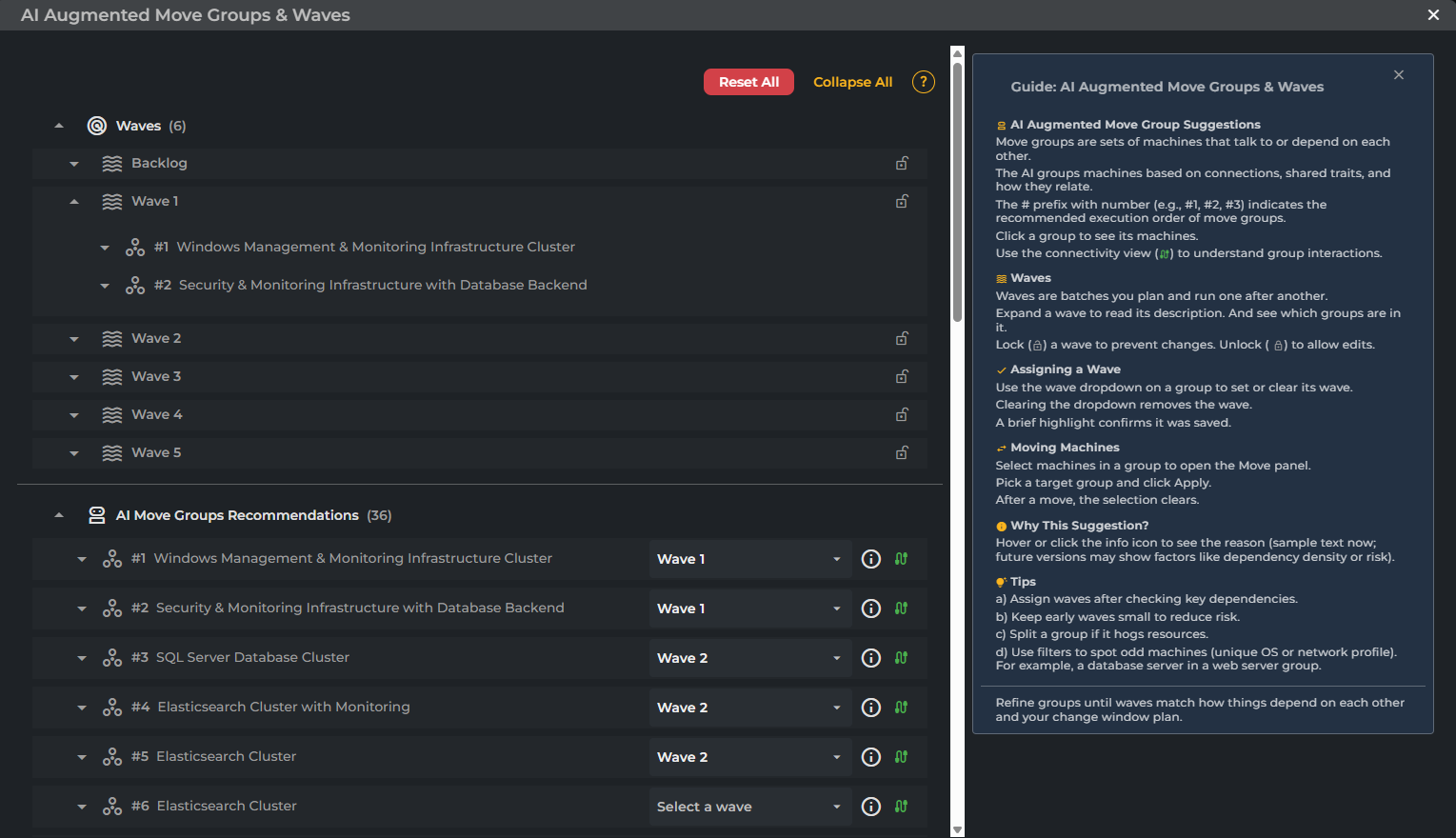
Cloudamize AI optimizes cloud migration by analyzing dependencies to automatically cluster servers into structured, sequential move groups. The platform then enables partners to easily tag move groups into Waves.
Key Features include:
Automated move group strategic clustering – Combining a Mathematical model with AI
Cloudamize collects detailed server communication and calculates the communication density to automatically cluster machines into logical move groups. By optimizing these groups based on interdependencies and size constraints, the Cloudamize AI model generates sequential Migration Waves, transforming complex server lists into structured, manageable units for execution.
Automated ordering and reasoning – Using AI models to evolve recommendations
The Cloudamize AI model creates groups of machines that communicate with or depend on each other. These groups are ordered to recommend an optimal replication path. This recommendation includes an AI generated explanation for the grouping rationale, which may include factors like dependency density or risk.
Easily allocate groups into waves
Tag groups that need to move together with the wave that matches your priorities. These tags will then automatically be propagated across all machines in the group.
Tailor groups and waves to meet your specific needs
Groups and waves can quickly and easily be tailored to meet your needs. Automated grouping is helpful and easy but sometimes the added human touch is necessary. However you choose to plan, Cloudamize is there to help you every step of the way.
Detailed views to explore groups, servers and dependencies
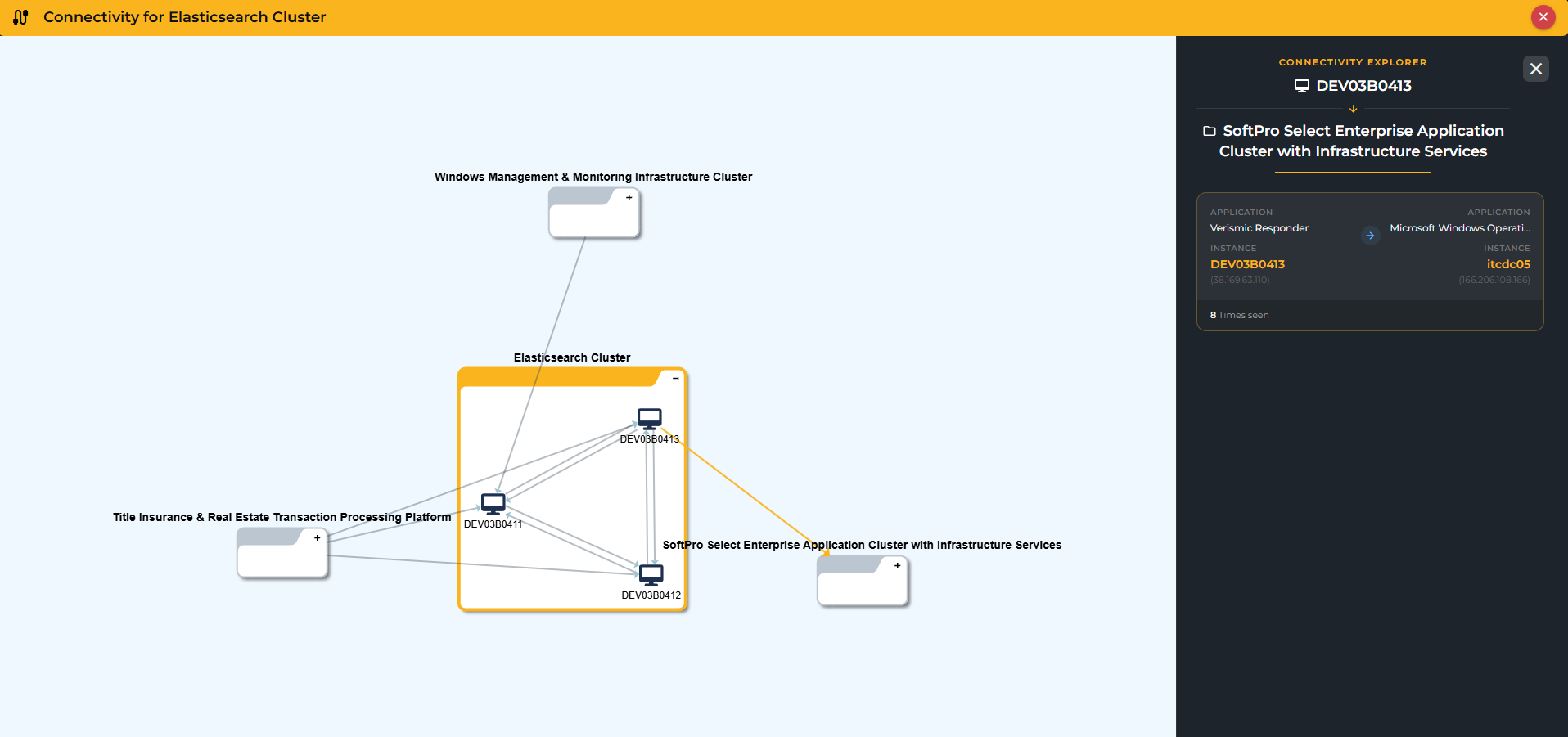
Explore your groups and waves through both graphical and table based views. Throughout the process of planning you can choose how you view and validate your plans to help you get the rightmost solution.
Just Released: Density indications for all application dependencies
 |
 |
Application Centric Planning
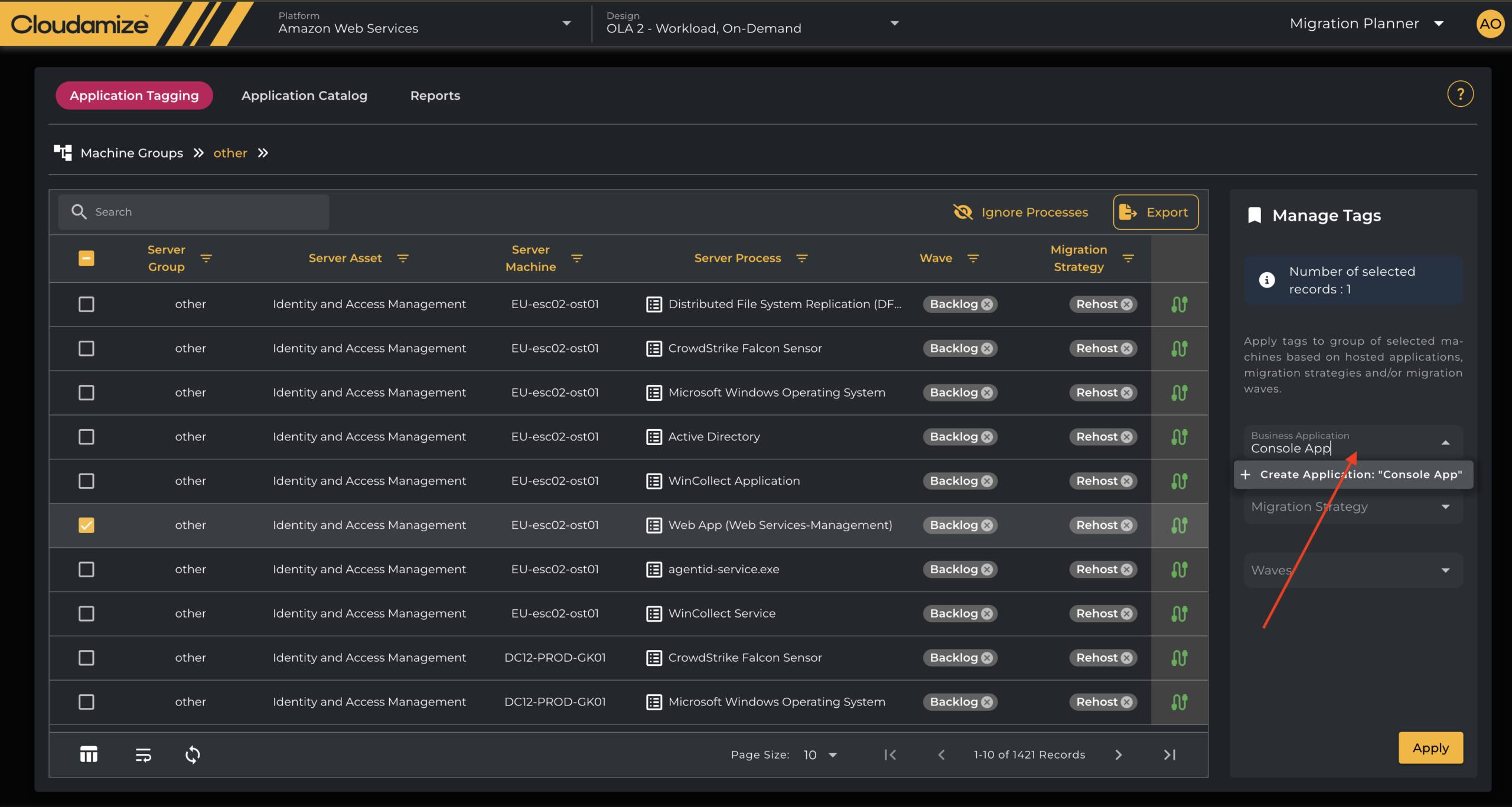
Application Tagging for Smarter Grouping
Tag workloads with labels such as “Wave 1”, “Replatform”, or “Business Critical.” Tags allow for logical grouping, easy filtering, and prioritization. This ensures migration aligns with both technical requirements and business goals.
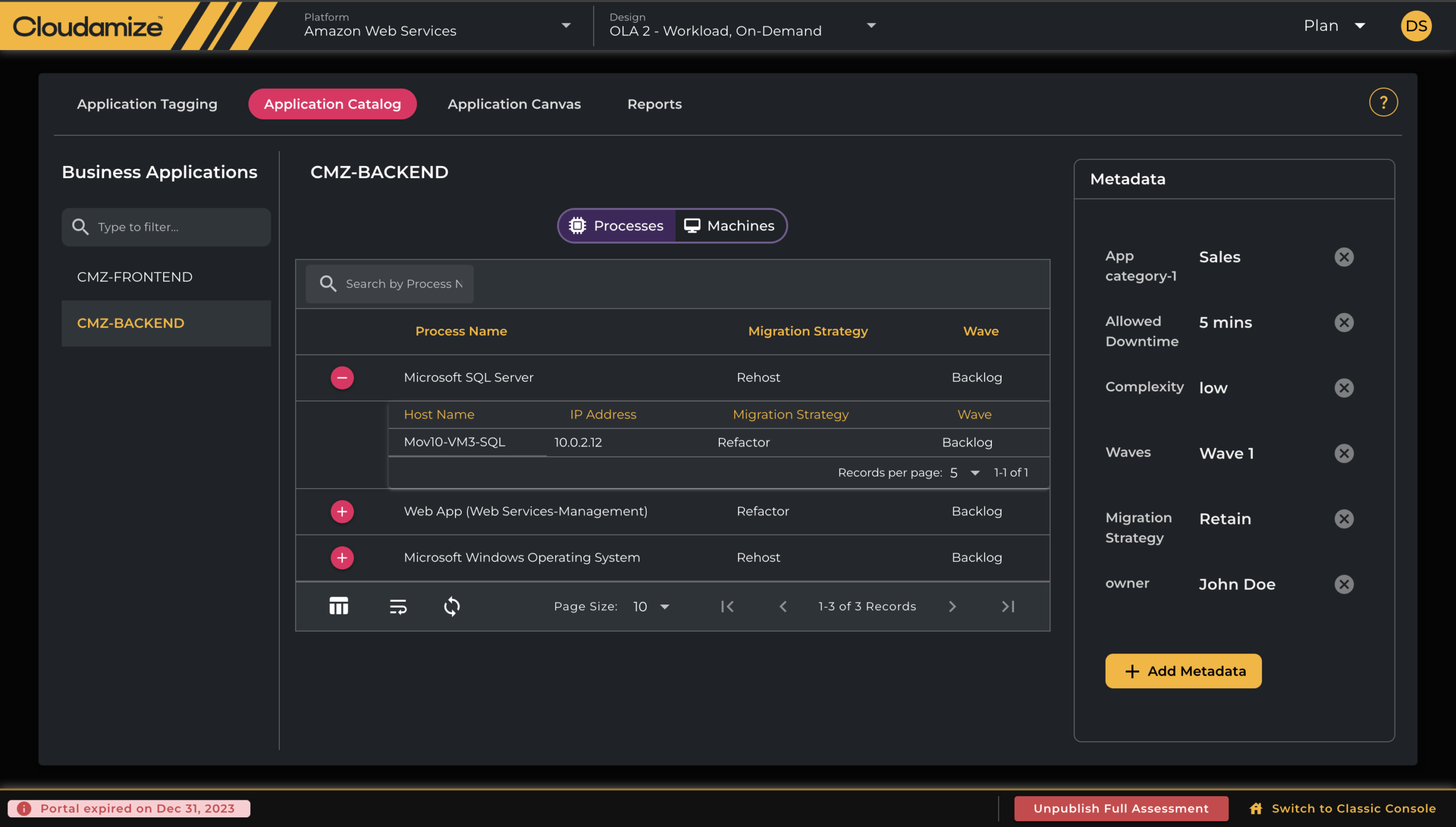
Application Catalogue: Your Cloud-Ready Configuration Management Database (CMDB)
Cloudamize’s Application Catalogue works like a lightweight CMDB. Teams can enrich discovered applications with metadata such as:
- Business owner
- Criticality and SLAs
- Migration strategy
This extra context makes planning more accurate and reduces surprises during execution.
Visual Canvas & Application View
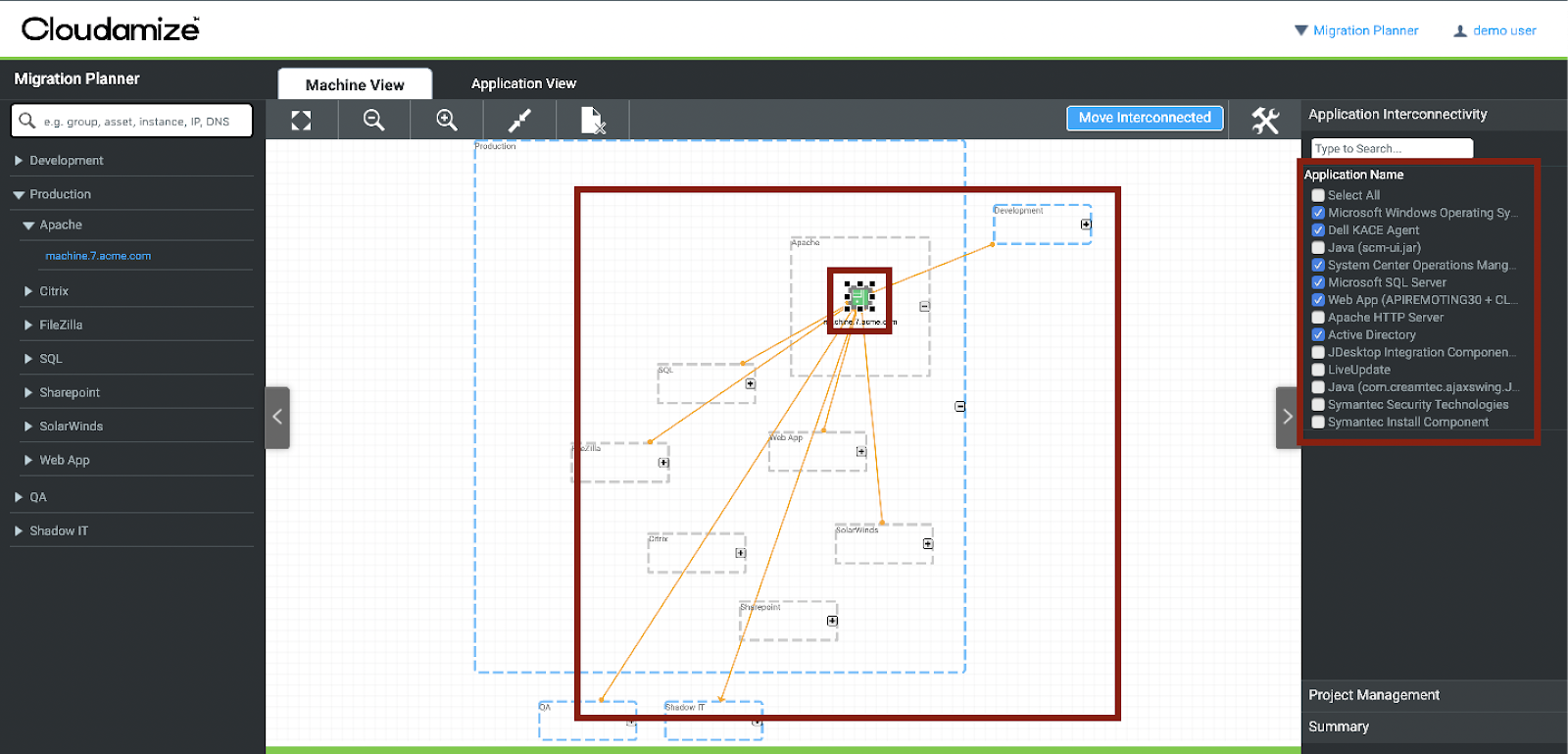
Instead of wading through spreadsheets, the Canvas View gives a graphical layout of applications and their dependencies. IT teams can drag, drop, and regroup workloads, instantly visualizing migration waves and interconnections.
Reporting
Rich Migration Reports
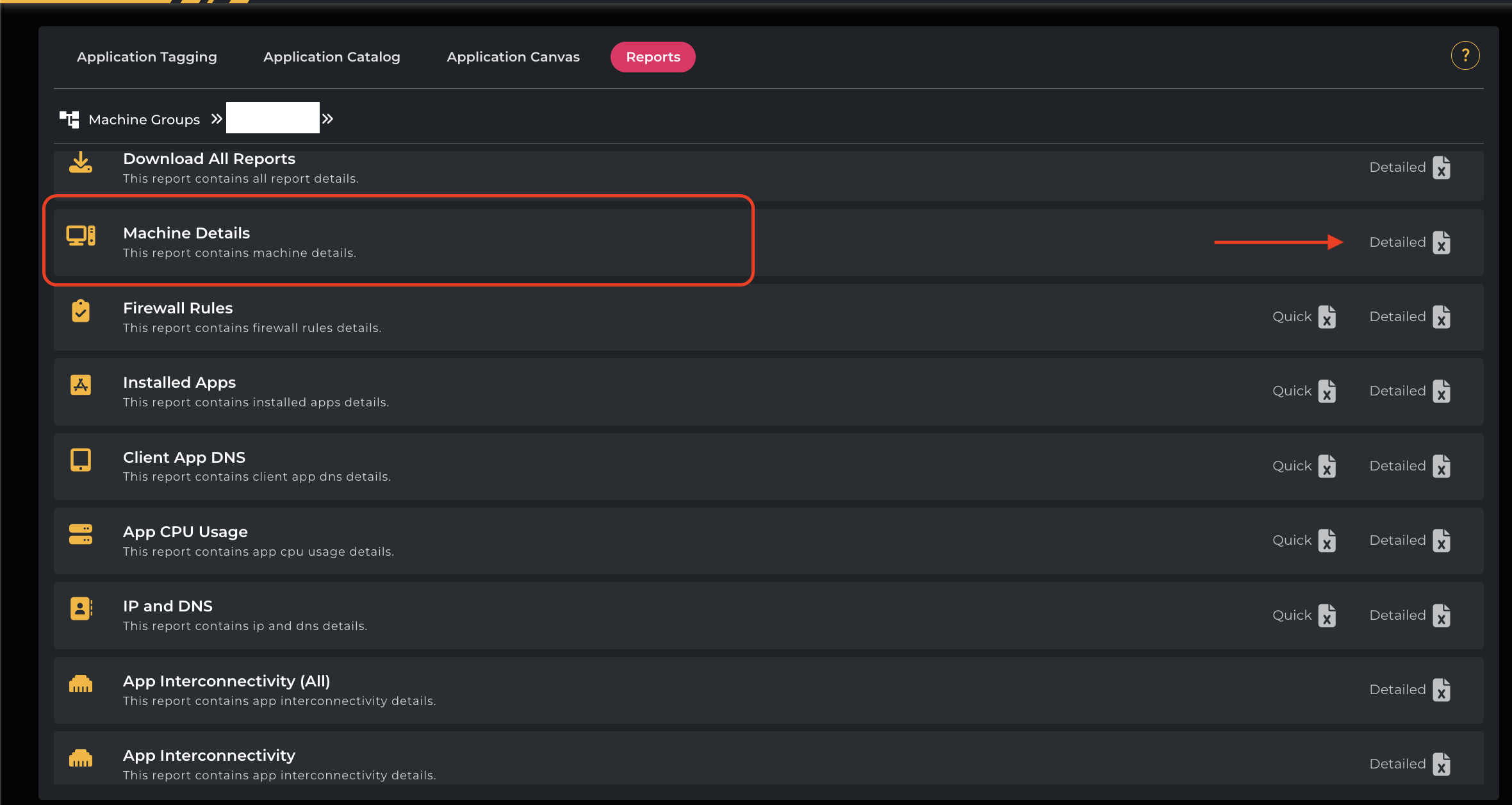
The PLAN component includes reports that surface critical details for decision-makers and stakeholders:
- Application Interconnectivity Report — a detailed map of how applications and systems communicate with each other across your IT environment. This report captures inbound and outbound traffic patterns, service dependencies, network connections, and more — delivering a real-time, actionable view of your application ecosystem. View example report
- Firewall Rules Report — helps you build accurate security policies and firewall rules for your cloud migration, ensuring that all necessary connections are maintained after the move. It shows all inbound and outbound communication rules observed during the monitoring period between servers, applications, or services. View example report
- Installed Apps — a detailed inventory of all software and applications discovered on your on-premises servers. The report helps you identify application dependencies, manage software licenses, and build a comprehensive migration plan. View example report
- CPU Usage Reports — provides deep visibility into how much CPU resources are consumed by individual applications running on each server or virtual machine in your environment, helping to inform rightsizing decisions. View example report
- DNS/IP Reports — provides detailed insight into the network configuration of each discovered asset, helping you to understand how your systems communicate, planning migration strategies, and ensuring your environment is properly configured for the cloud. View example report
Flexible CSV Import & Export
Need to merge Cloudamize insights with your existing spreadsheets or governance workflows? The PLAN module supports:
- Importing CSVs to define move groups
- Exporting custom reports for downstream tools and project tracking. These reports can be pivoted to be server centric or application centric, and contain custom ordered columns.
This balance of automation and manual control keeps migrations flexible.
Why the Planning Stage Matters
Cloud migration projects often stall due to poor planning. The PLAN component reduces risk by:
- Making dependencies visible — so you don’t break critical apps.
- Aligning IT with business priorities — via tagging and catalog metadata.
- Balancing automation with control — through CSV tools and visual views.
- Providing transparency — via comprehensive reporting.
With PLAN, enterprises avoid costly rework and move to the cloud on time and on budget.
Best Practices for Using Cloudamize PLAN
- Start with clean discovery data — ensure accuracy from the beginning.
- Define a tagging taxonomy early — by business unit, owner, or migration wave.
- Use the Application Catalogue to enrich workloads — add ownership, SLA, and migration type.
- Leverage Canvas View for visual validation — align migration groups with dependencies.
- Review reports across teams — security, networking, and app owners should all validate assumptions.
Conclusion: Plan Smarter, Migrate Faster
Cloud migration doesn’t have to be overwhelming. With Cloudamize’s PLAN component, you gain structure, visibility, and control — turning discovery insights into a clear migration roadmap.
Learn more about the Cloudamize platform and see how PLAN can accelerate your move to the cloud.
Ready to take the next step? Schedule a demo with us.
Author