When we released the Cloudamize MCP Server, we opened the platform to a new generation of AI assistants and agentic systems — letting tools like Claude, Cursor, and enterprise migration agents query assessment and migration data directly. The response told us something clear: teams want that data in the assistants they already use, and they want that connection to be effortless.
Today we’re taking the next step. Cloudamize now offers a dedicated OAuth endpoint, connect.cloudamize.com, that lets you link an AI assistant to your Cloudamize data with a browser sign-in — no tokens to generate, copy, or refresh.
Until now, connecting meant creating an access token and pasting it into a configuration file. That works well for developers and automation, and it isn’t going anywhere. But for someone who just wants to ask Claude Desktop about their migration plan, it was a step too many. The new endpoint removes it.
For end users, this means connecting is as simple as logging in. In a client like Claude Desktop, you add Cloudamize as a custom connector, enter a single URL, and sign in through your browser with the Cloudamize account you already have. The assistant discovers the available tools automatically and you’re ready to ask questions such as “Show my infrastructure assessment,” or “What’s the TCO for this plan?” in plain language. If your account spans multiple engagements, you simply choose the one you want to work in.
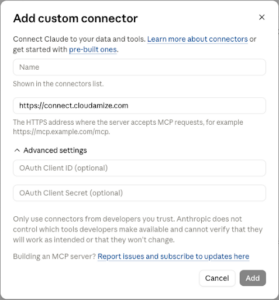
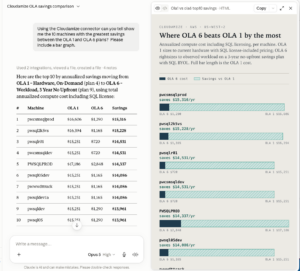
For security teams, this means fewer credentials in the wild. OAuth sign-in means your password is never stored by the MCP server. It’s exchanged once, at login, for a short-lived session. There’s no long-lived token sitting in a config file to leak or rotate. When a session expires, the assistant guides you back through a quick sign-in rather than asking you to hunt down a new token.
For platform and automation teams, this means nothing breaks. The original endpoint, mcp.cloudamize.com, continues to serve token- and API-key-based access exactly as before — ideal for Cursor, config-file clients, CI pipelines, and agentic systems like AWS Transform and Kiro. Both endpoints expose the same tools and the same data. You choose the connection style that fits each use case, and the two run side by side.
“Making our data effortless to reach is the whole point of an MCP server. With OAuth sign-in, connecting Cloudamize to the AI tools our customers already trust is now a matter of seconds, without asking anyone to manage a credential.” — Johnson Abraham (Partner & CTO of Cloudamize)
Getting started takes about a minute. Full setup instructions for both endpoints are available in our MCP Server End User & Integration Guide. To see what data-driven migration planning looks like inside your own AI assistant, request a demo and we’ll walk you through it.
Author