Fast answers are tempting. Here’s what you give up when you cut data collection from two weeks to a week, three days or a single day.
“Can we get this done faster?” It’s one of the first questions we hear at kickoff, and it’s a fair one. Migration programs run on deadlines, and nobody wants to wait two weeks for data before the real planning starts.
The market has noticed. Assessment tools now promise a business case in minutes, results the same day, or right-sizing from a single upload. Some of those promises are useful. Others confuse how fast a tool can compute an answer with how much it actually knows about your workloads.
We recommend at least 14 days of live performance data and application dependency collection as part of a standard Cloudamize assessment. Rather than just repeat that advice, we went back to our own data and measured what a shorter collection would have cost real customers.
What a collection window is really measuring
Right-sizing isn’t about a server’s average day. It’s about its busiest one.
When Cloudamize sizes a server for the cloud, we look at how hard it works every day of the collection, capture the peak for each day, and size to a high percentile of those daily peaks. That way the cloud instance, volume, or network link is built for the heaviest load the server really sees, not a quiet Tuesday afternoon.
That approach has a simple consequence. A short collection can only size to the busiest day it happened to see. If the weekly backup, the Friday batch run or the month-end close falls outside the window, the assessment never sees it, and the recommendation comes out smaller than the workload needs.
Short windows almost never make a server look bigger than it is. The error runs in one direction: under-sizing. And under-sizing is the error you find after cutover, when the application is slow and the business is watching, and the fix costs more than the plan expected. Emergency upgrades to larger instances or faster storage tiers raise the monthly bill, and the added capacity often runs at on-demand rates, outside the reserved instances or savings plans bought for the original plan.
What we found when we shortened the window
We took seven recent customer assessments, about 2,000 servers that each had at least 14 days of collected data. For every server we asked a simple question: what would the sizing input have been if the customer had stopped collecting after 7 days, 3 days or 1 day? We tested every possible start day, so weekday and weekend starts are both in the numbers.
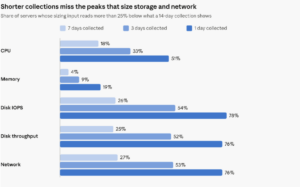
Cloudamize analysis of seven recent assessments, about 2,000 servers with 14+ days of data, October 2026. Every possible start day was tested.
Three things stand out.
Memory is forgiving. Storage and network are not. Memory use is fairly flat from day to day, so even a one-day snapshot gets most servers close. Disk and network are spiky. Backups, batch loads, and file transfers often run once a week or less, so even 7 days misses the peak on about a quarter of servers.
The totals shrink, not just individual servers. Add up every server’s storage demand and a 1-day collection captures only 37–38% of what 14 days shows. For network it’s 48%. At 7 days, the estate-wide totals land at 84–90% for storage and network, and 91% for CPU.
Every estate is different. At 7 days, one customer had just 4% of servers under-read on CPU. Another had 64% of servers miss a network peak. You can’t know which kind of estate you have until you’ve measured it.
And 14 days isn’t a magic number either. For customers who collected 28 days or more, a 14-day window still missed a monthly CPU peak on about 1 server in 10. That’s why many of our customers collect for four to six weeks when month-end or quarter-end processing matters.
What the “faster” claims leave out
If you’re comparing assessment approaches, you’ll hear some version of the claims below. Each has a grain of truth. Here’s what to ask.
“Upload your inventory and get a TCO in minutes.”
An inventory file tells you what each server has been allocated, not what it uses. That’s genuinely useful for a first business case, and it’s why we offer one ourselves. But it can’t right-size anything. One major cloud provider’s own documentation says assessments built from an imported inventory get no performance coverage at all.
Allocation-based sizing also tends to err high. Servers are routinely provisioned for a worst case that never comes. We’ve seen estates where nearly every server was overprovisioned. An inventory-only estimate carries that waste straight into the cloud.
“A day or a week of performance data is enough.”
Our numbers say otherwise. With one day of data, half of servers under-read their CPU peak by more than 25%, and three in four under-read storage and network. Even a full week misses the storage and network peak on about one server in four.
The fine print often agrees. One widely used assessment tool tells users to profile for the full assessment period, and it applies a comfort factor (1.3x in its example) to make up for limited history. A major cloud provider’s own guidance defines the utilization data used for right-sizing as 5-minute samples over at least one month.
“Results in hours, not weeks.”
How fast a tool calculates is not the same as how much it has measured. Any tool can produce an answer in minutes from whatever data it has. The question is whether that data includes your busiest days, and shows the complete picture. One of the same vendors notes elsewhere that a typical discovery takes a few weeks.
“We fill the gaps with industry benchmarks.”
A benchmark is an assumption about an average server. Your Friday batch job, your nightly backup and your month-end close aren’t in it. Benchmarks are a reasonable placeholder for a rough estimate. They’re not a sizing plan.
“Up to 50% savings, fast.”
Be careful with savings that arrive quickly. A short collection under-reads demand, and under-read demand produces smaller instances, smaller volumes and a lower cloud bill on paper. In our data, a one-day window captured only 37–48% of the storage and network demand that two weeks revealed. Savings built on missing peaks are borrowed, and they come due after cutover.
How to move fast without sizing blind
The goal isn’t a longer assessment. It’s the right answer for each decision, as early as the data allows.
- For an early business case, use a directional estimate. An inventory file such as an RVTools export is enough to frame the opportunity. That’s exactly why we built Cloudamize Express: upload a file and get a TCO view in moments. Treat it as a signal, not a sizing plan.
- For sizing you’ll commit to, collect at least 14 days. Two weeks covers two full weekly cycles, so weekly backups and batch jobs are seen at least twice. If month-end or quarter-end processing matters, plan for four to six weeks.
- Save time where it’s actually lost. In many projects the delay isn’t the collection window. It’s getting collectors approved and deployed. Deploying during kickoff, and confirming every server is reporting on day one, saves more calendar time than cutting the window ever could.
- Know which numbers settle first. Memory and steady CPU settle within the first week. Storage and network keep changing until the busiest jobs have run, so treat early storage and network numbers as provisional.
The cost of waiting a few more days is a few more days. The cost of under-sizing storage and network shows up after cutover, as slow applications, emergency upgrades and a migration budget that no longer holds.
The bottom line
Speed matters, and a good assessment process should respect your timeline. But the fastest answer isn’t worth much if it’s built on the quietest days of the month.
Use a quick, inventory-based estimate to start the conversation. Then give the assessment enough time to see how your workloads actually behave: at least two weeks, and longer when month-end matters. That’s the difference between a number that looks good on a slide and a plan that holds up after a cutover.
Want to see what two weeks of real data says about your estate? Request a demo with us, start with a free directional analysis with Cloudamize Express, or contact us to begin a full collection of your data.
Author
